Access control
An access control list (ACL) restricts the objects of a type to certain user groups. This page shows how to set one up. How ACLs and system rights work together is explained in Users, rights and ACLs; types are configured as described in Build types and categories.
ACL vs. system rights
ACLs refine system rights; they don’t replace them. A group needs both:
the system right for the action, for example
base.framework.object.view, andif the type’s ACL is active, the matching ACL permission, here Read.
A group without the system right cannot perform the action even if the ACL lists it. The ACL only adds restrictions.
An ACL grants four permissions, after the four basic operations on stored data:
Permission |
Allows |
|---|---|
Create |
Creating objects of the type. |
Read |
Seeing objects of the type, in lists, the object view, search and exports. Without it the group also doesn’t see the type itself (3.3). |
Update |
Changing objects of the type. |
Delete |
Deleting objects of the type. |
Type ACL
Large CMDBs often hold information that only some teams may see. A type ACL makes the objects of one type visible to certain groups and hides them from others. It covers every kind of access to the objects, including search and export.
Configuration |
Access |
|---|---|
No ACL defined |
Every group has access. |
ACL deactivated |
Every group has access. |
ACL active, group not listed |
No access. |
ACL active, group listed without the permission for the operation |
No access for that operation. |
ACL active, group listed with the permission for the operation |
Access. |
The ACL applies to every group, including Administrator.
Configure a type ACL
Open the type in the type builder and go to the ACL step.
Turn on ACL activated. While it is off, the settings are greyed out.

The ACL step with the ACL deactivated.
Add groups and select the permissions for each.
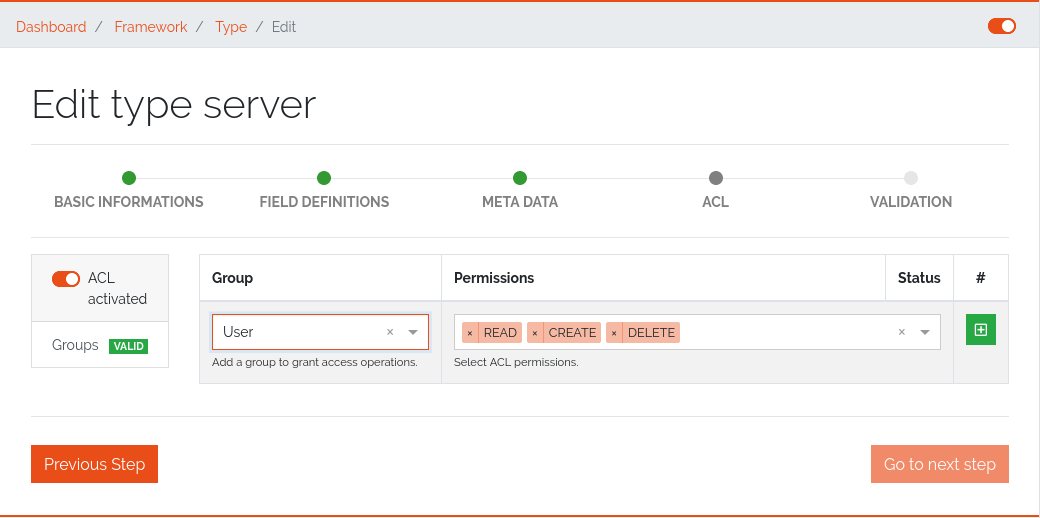
Adding a group to the ACL.
The added groups appear in the list below, where you can change their permissions. Save the type.

A type ACL with groups.
A group can appear only once in an ACL; you cannot list the same group twice with different permissions.
If you deactivate the ACL later, its entries are kept but no longer applied.
Warning
An active ACL without any group grants nobody access. DataGerry refuses to delete a group if it is the only group an active ACL grants access to, because the type and its objects would then be unreachable for everyone.
Check the ACLs of a group
Settings → ACL (Object ACL Management) shows, for one group, every type with
whether its ACL is active and which permissions the group has. Select the group at
the top. With base.framework.type.edit you can open a type’s ACL from there. The
same table is shown when you edit a user, for the user’s group.