IPAM
Licensed feature — on self-hosted installations this needs a license that includes IPAM; in the cloud it is part of the subscription. See Cloud or self-hosted.
IP Address Management (IPAM) tracks your address space inside the CMDB. You register large network blocks (supernets), divide them into subnets, and see which addresses are used or free and which object uses each one. This page assumes you know types, objects and section templates (Build types and categories, Work with objects).
Cloud and self-hosted
In the cloud, IPAM is available depending on your subscription. On a self-hosted installation it is unlocked by a license that includes the IPAM feature. Without it, the IPAM special types are shown as locked with Upgrade to unlock, and the Networks tree in the sidebar shows the same hint. The same license feature also unlocks Racks and Ports and cabling.
How IPAM is organised
IPAM has no separate data store. Its entities are ordinary objects of dedicated special types; the reference fields between them are wired automatically when you create the types.
Entity |
What it is |
|---|---|
Supernet |
A top-level network block, e.g. |
Subnet |
A range inside a supernet, e.g. |
VLAN |
Optional. References a subnet and records VLAN information (Static / Dynamic). |
Interface |
An entry of the predefined Interfaces section template, a multi-data section. This is how a regular object (server, client, router …) claims IP addresses. |
The links are plain references: Subnet → Supernet, VLAN → Subnet and Interface → Subnet. An address counts as used exactly when an interface entry on some object references its subnet and holds that address.
Set up IPAM
The three special types Supernet, Subnet and VLAN must exist first. Create them in one of two ways:
Start Assistant — the IPAM profile of the Start Assistant creates Supernet, Subnet and VLAN (in that order, so the references wire up) in a Network category.
Type builder — when you create a type, choose the Special type in the basic step. The special type is assigned when the type is created and cannot be changed afterwards.
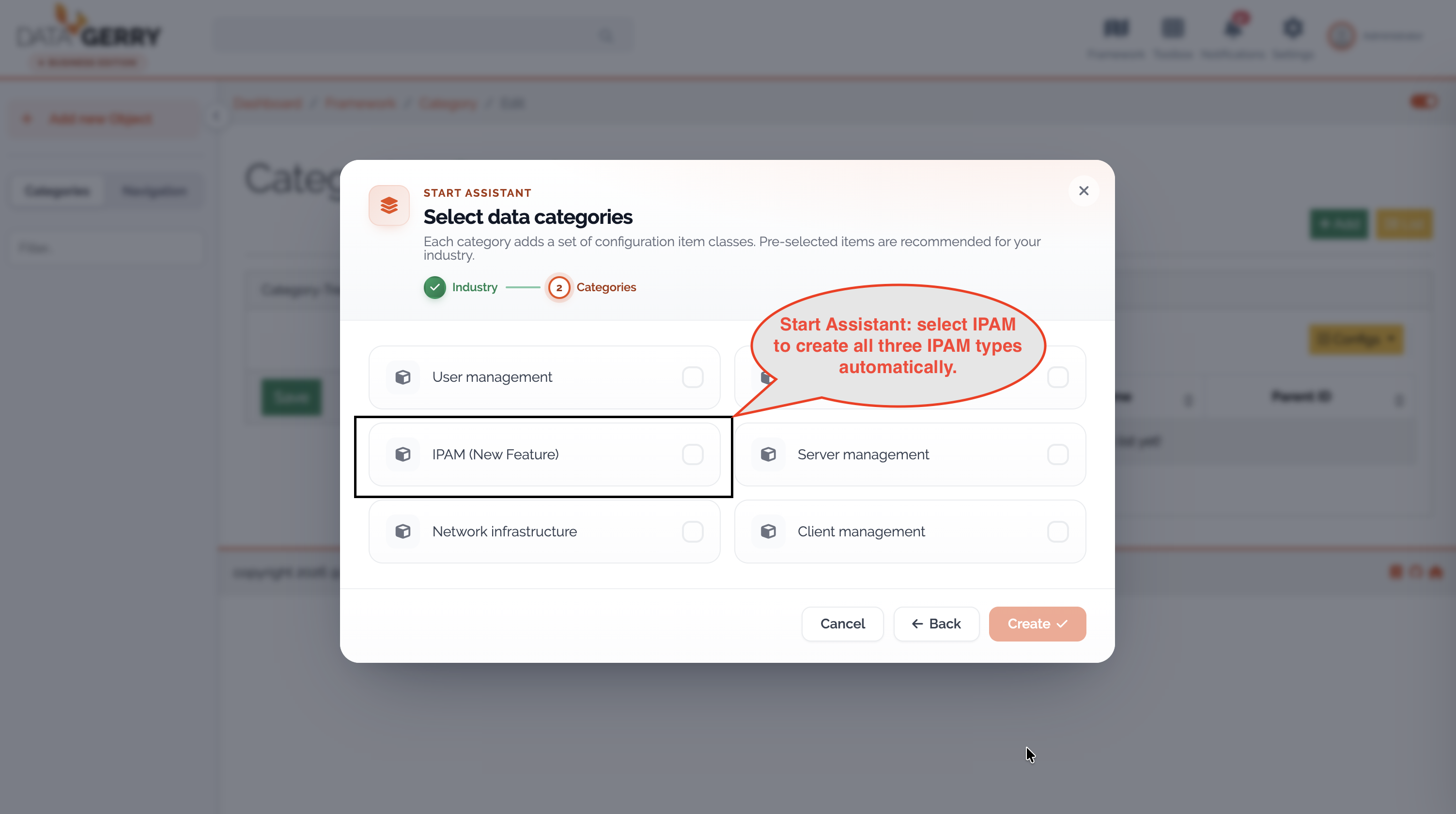
Creating the IPAM types with the Start Assistant.
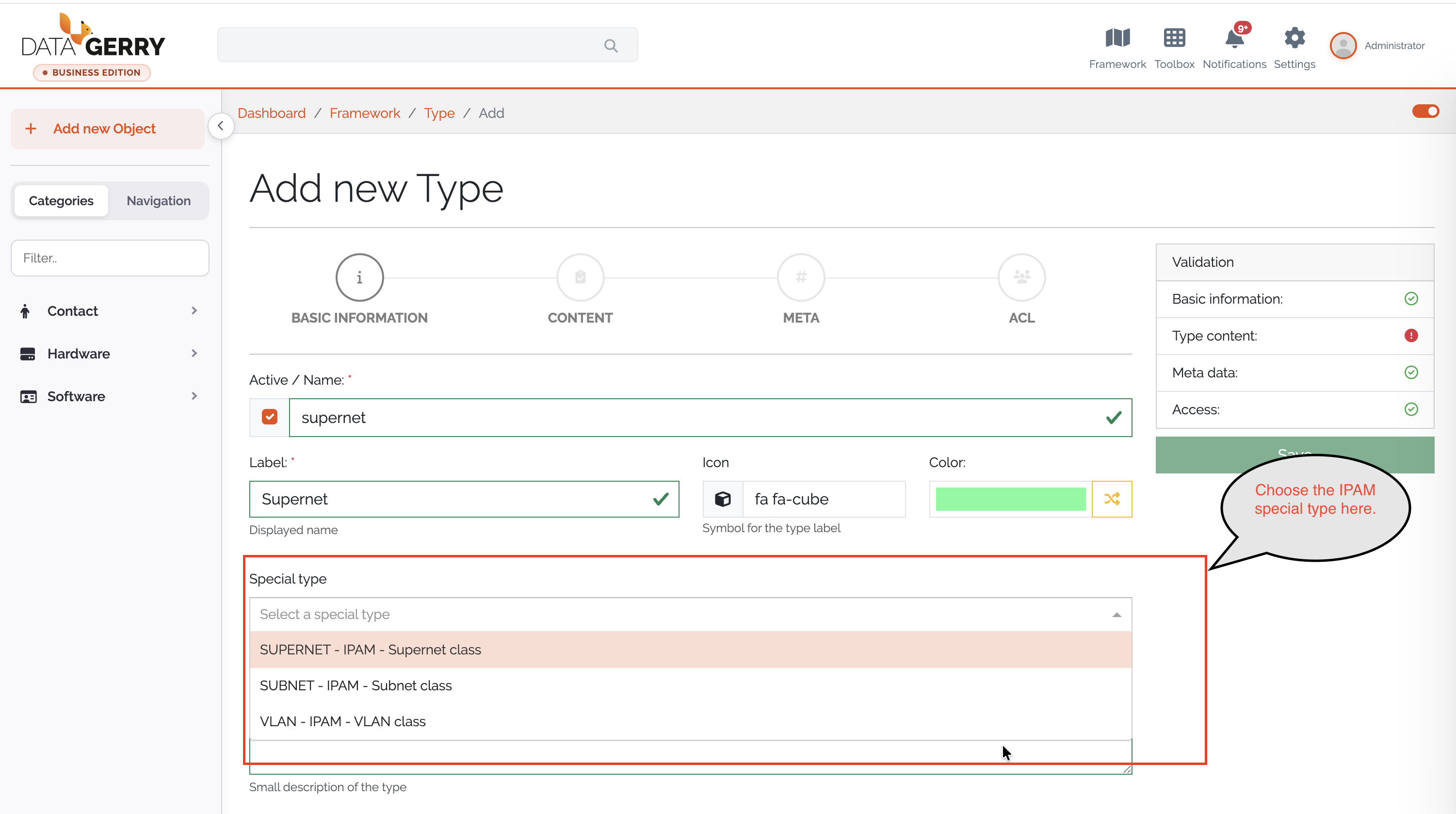
Choosing a special type in the type configuration.
To let an object hold IP addresses, add the Interfaces section template to its type.
Find your networks
In the sidebar, open Navigation → Networks. The tree lists every supernet (expand it for its subnets) and an Unassigned group for subnets without a parent. Each node shows its CIDR, an IPv4/IPv6 badge and the object name; Search networks… finds an entry.
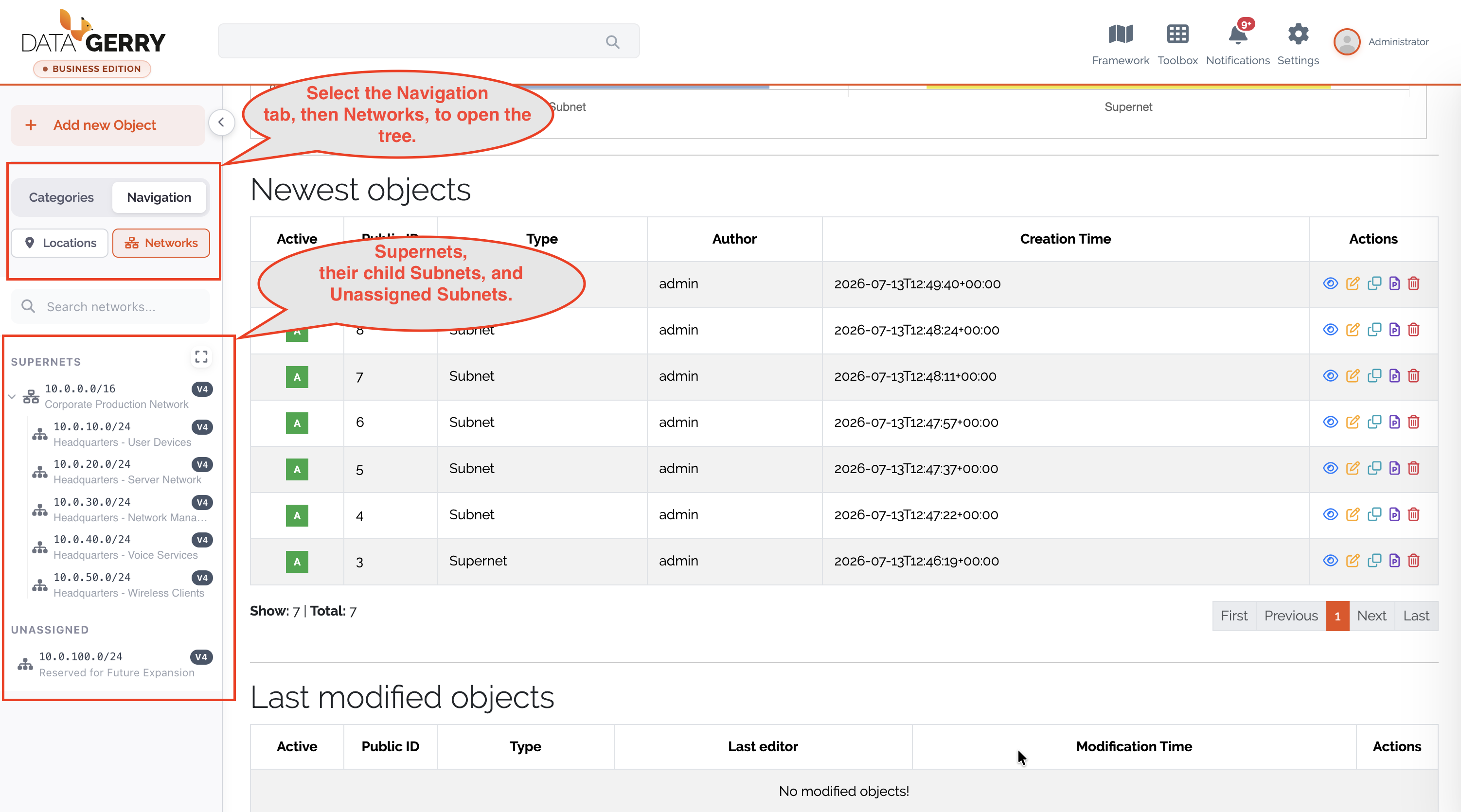
The Networks tree in the sidebar.
Click a node to open the object. IPAM has no page of its own — its overviews are part of the object view, below the attributes: a supernet shows the Supernet Overview, a subnet the IP Address Overview.
Register a supernet
Create an object of your Supernet type.
Fill in the fields:
Name — a descriptive name for the block.
Type — the address family, IPv4 or IPv6 (required).
Network Range — the block in canonical CIDR notation, e.g.
10.0.0.0/8(required).
Save. DataGerry checks that the range is a canonical CIDR and that Type matches the family of the range.
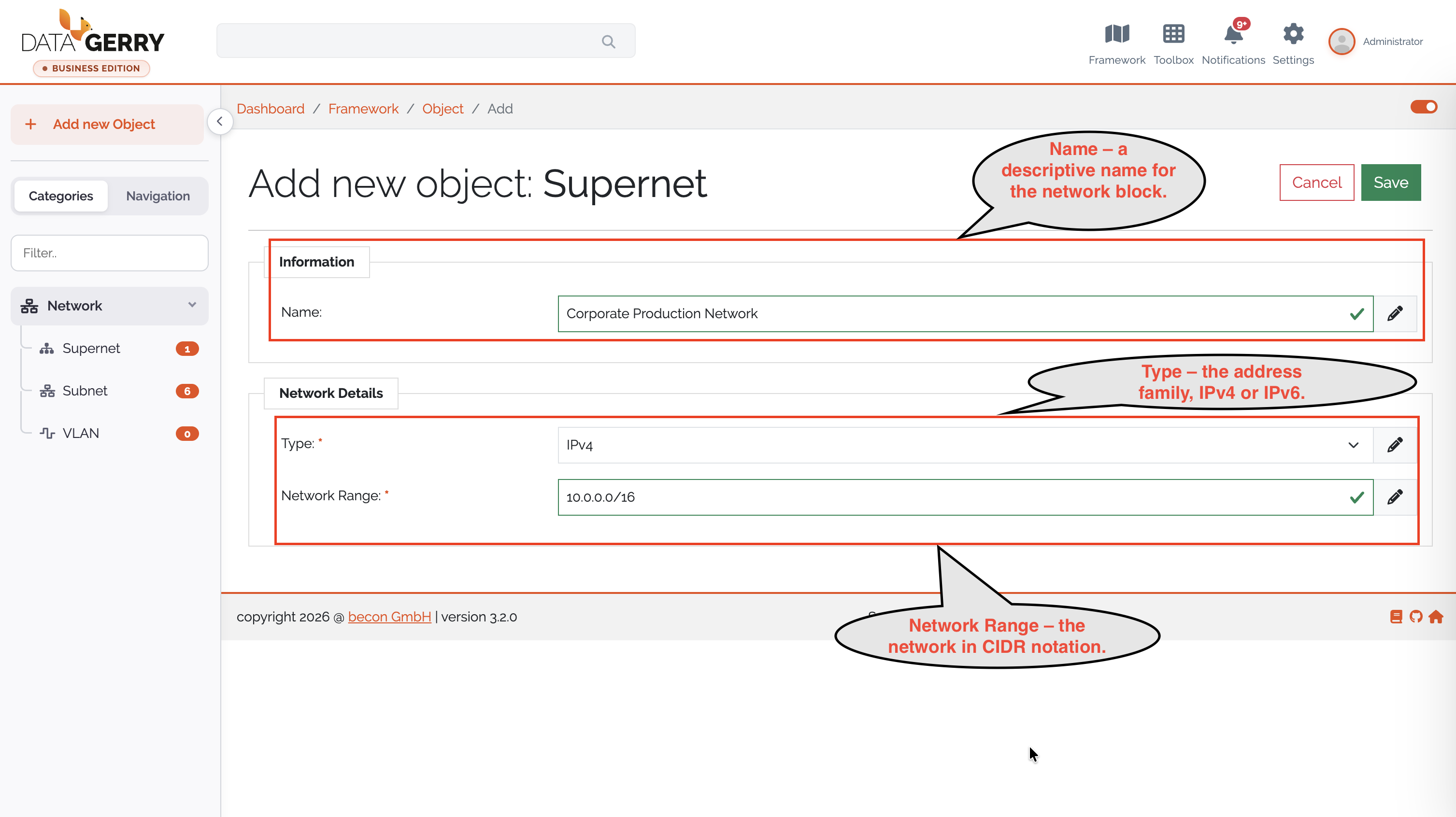
Creating a supernet.
Supernet Overview
Key figures — Total Subnets, Total IPs, IP Range (first–last address), Used IPs, Free IPs and Conflict IPs. IPv4 supernets also show an Overall Utilization bar.
Subnet table — the child subnets with CIDR, Used IPs, Free IPs, VLANs and, for IPv4, Utilization. Rows expand lazily to show nested subnets. A Search subnets… box and an Export button (CSV) are available.
Unassign subnets — the row action, or a bulk action on selected rows, removes subnets from this supernet after a confirmation. The subnet’s parent reference is cleared and it becomes Unassigned; it is not deleted.
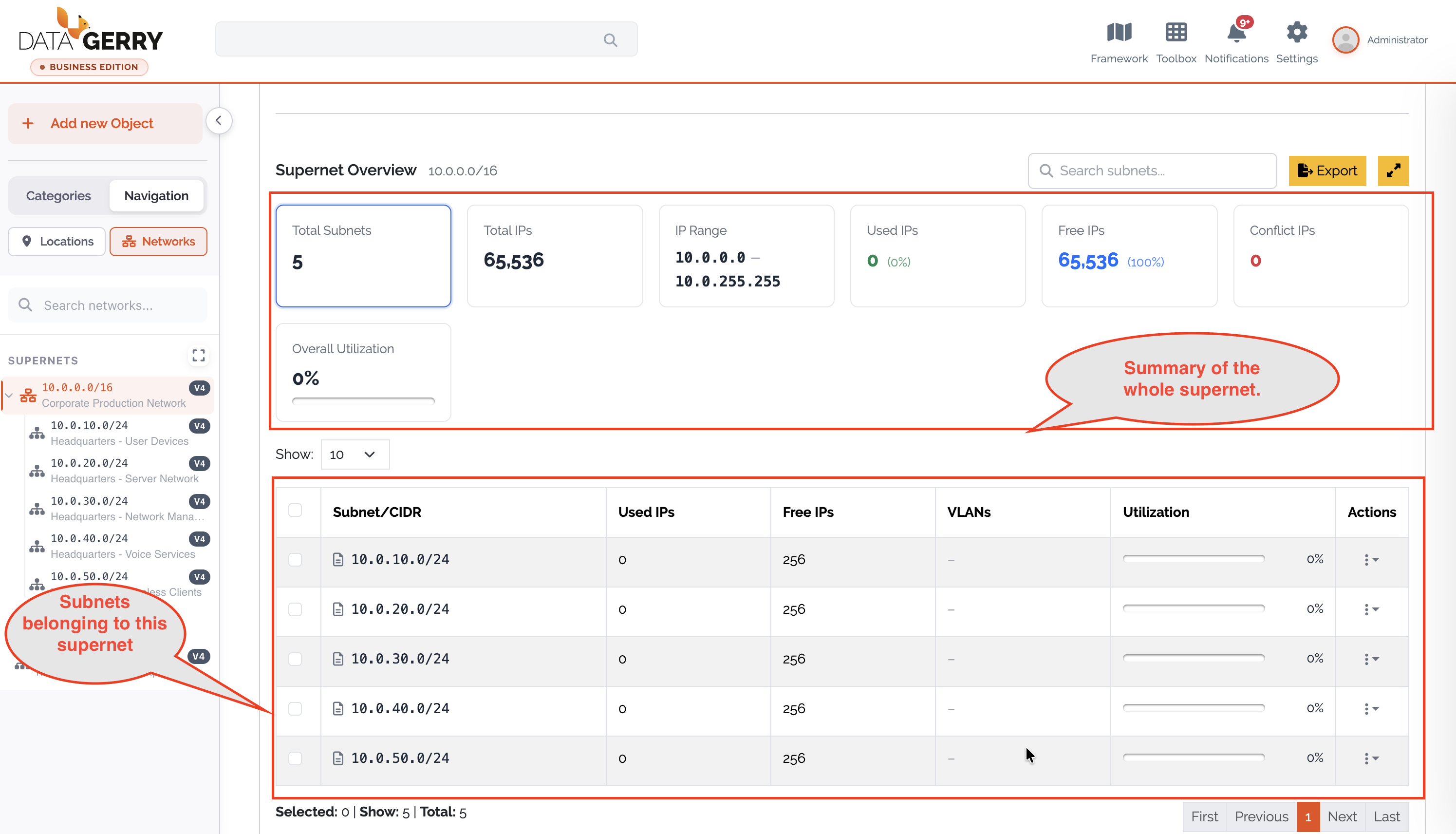
The Supernet Overview.
Register a subnet
Create an object of your Subnet type.
Fill in the fields:
Name — a descriptive name.
Supernet — optional, the parent supernet.
Type — the address family, IPv4 or IPv6 (required).
Network Range — the subnet in canonical CIDR notation, e.g.
10.0.1.0/24(required).
Save.
The Network Range is checked live against the server while you type: it must be a canonical CIDR of the selected family and, if a supernet is set, lie inside that supernet and not overlap a sibling subnet. The same checks run on save.
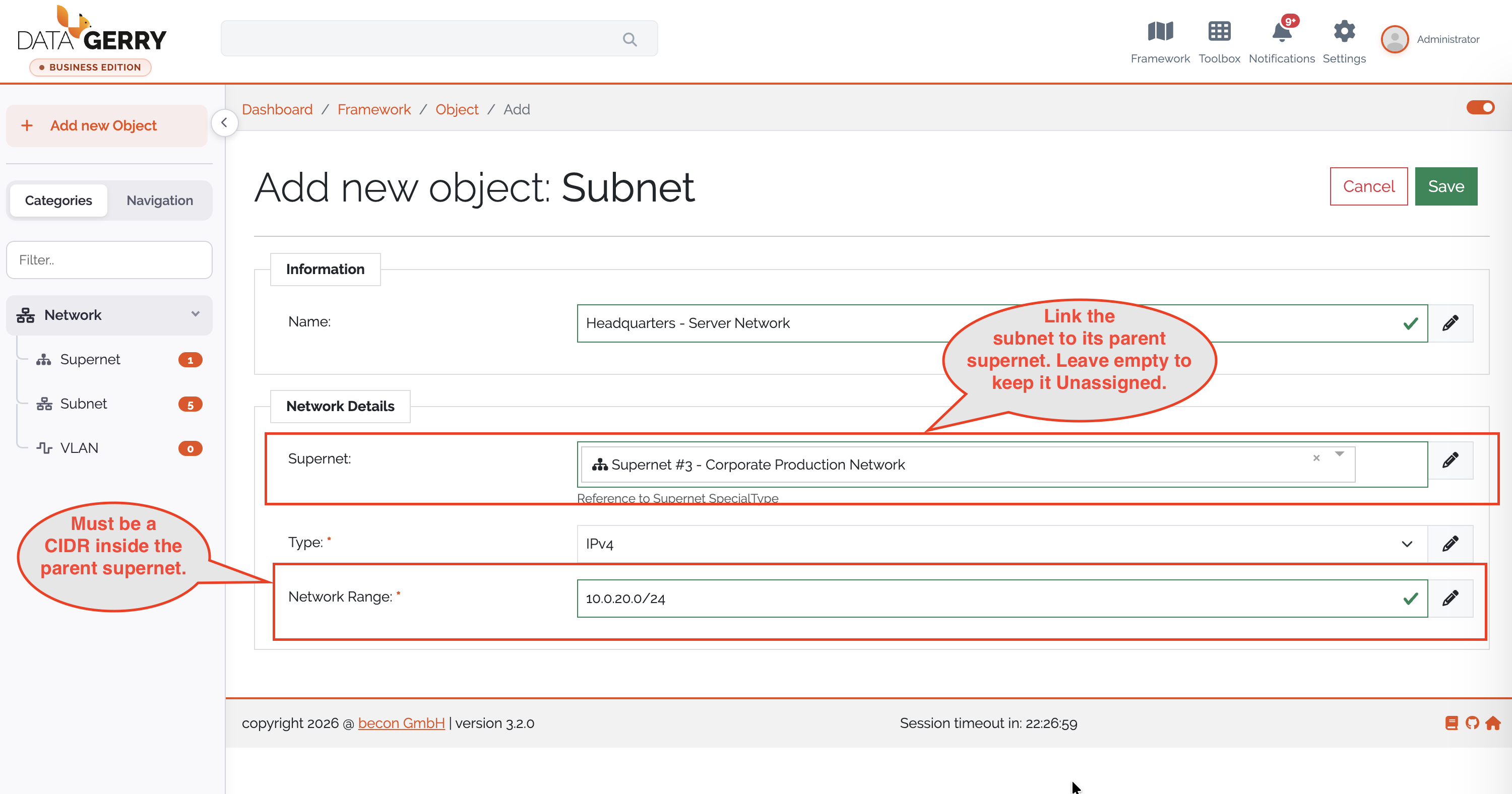
Creating a subnet with live range validation.
IP Address Overview
Opening a subnet shows every address of the subnet with its status.
Key figures — Network (CIDR), Total IPs, Assignable IPs, Used IPs, Free IPs, Conflict IPs and Assigned VLANs.
Charts — IP Distribution (a heatmap of the address range) and Distribution by Type.
IP table — IP Address, Type, Status, Assigned To, MAC Address and Actions. Every column except Actions sorts; free addresses always sort last.
Narrow the table down by:
clicking a sector of IP Distribution to drill into that range,
clicking one or more types in Distribution by Type,
toggling Free to show only unused addresses,
searching (at least two characters; searches the whole subnet),
clicking the Conflict IPs card to show only conflicts (see Notes and limitations).
Export downloads the list as CSV.
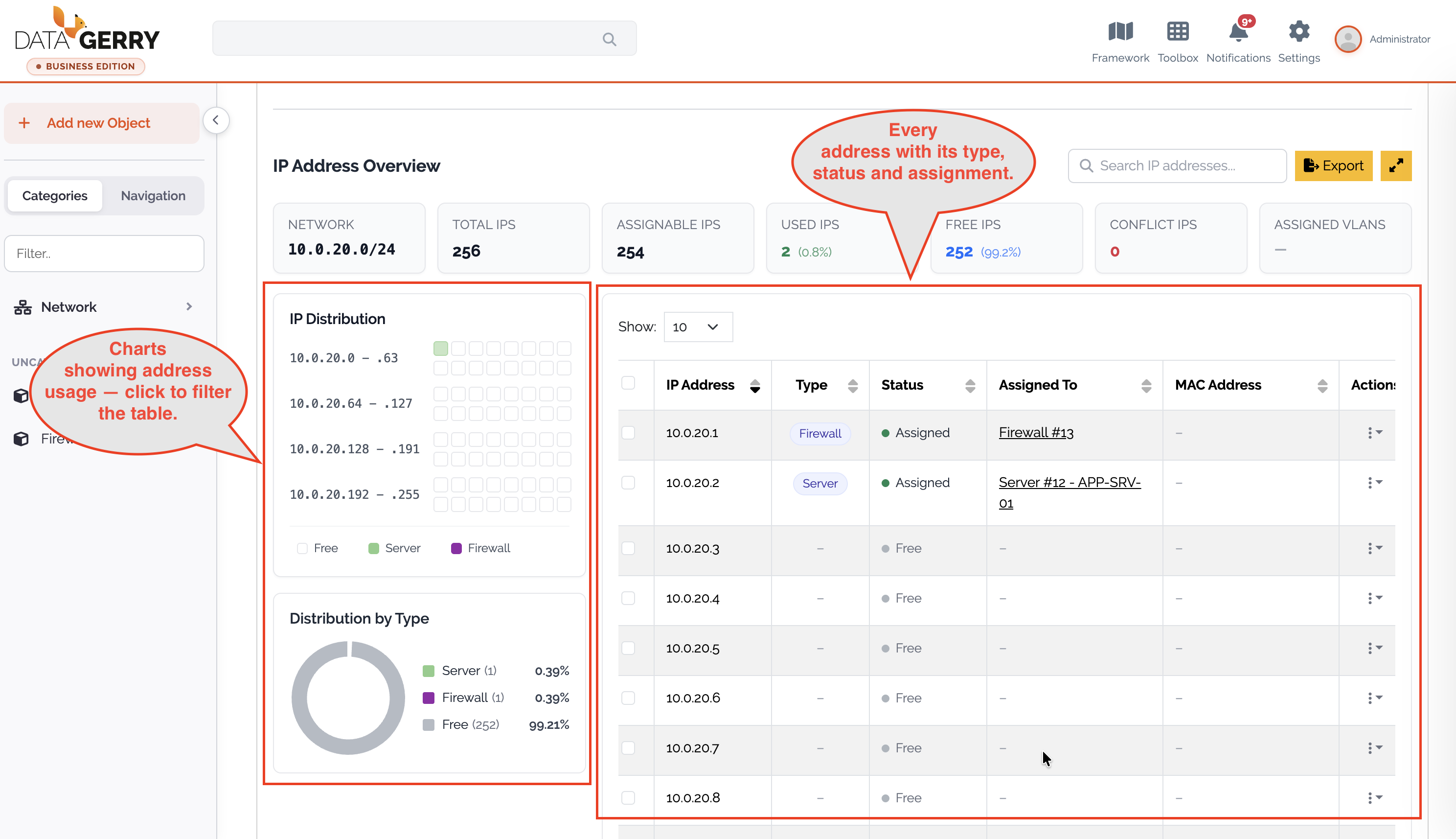
The IP Address Overview.
Assign an IP address
From the subnet
In the IP Address Overview, find a row with status Free and choose Assign.
In the Assign IP dialog, select the Object. Only objects that have an Interfaces section are offered.
DataGerry prepares a new interface entry with Active, the address family (Type), the Subnet and the IP address filled in and locked. Fill in Hostname, Domain and MAC-Address if you want.
Click Assign. The entry is added and the object saved; existing interface entries are not touched.
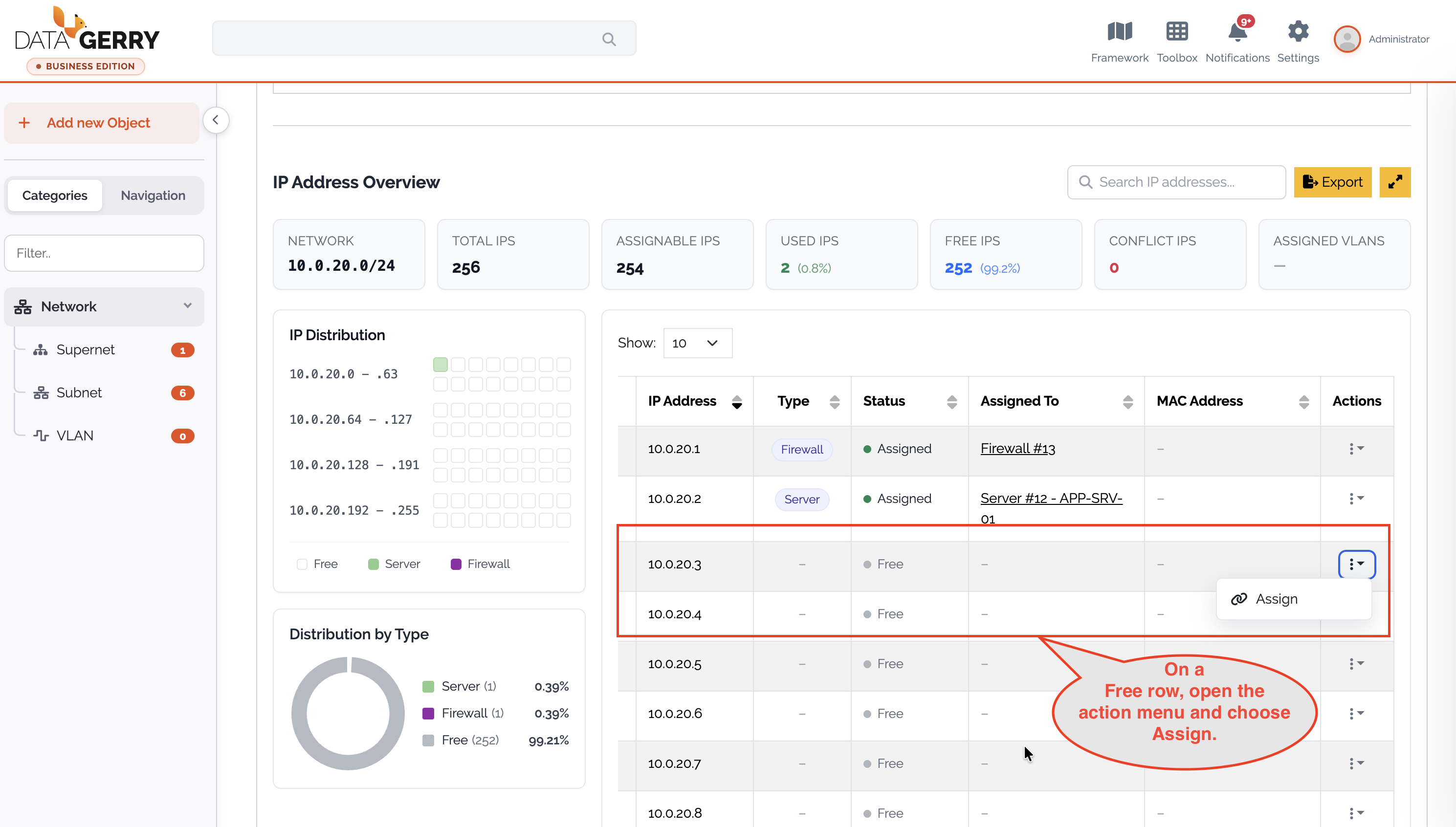
Starting the assignment from a free address.
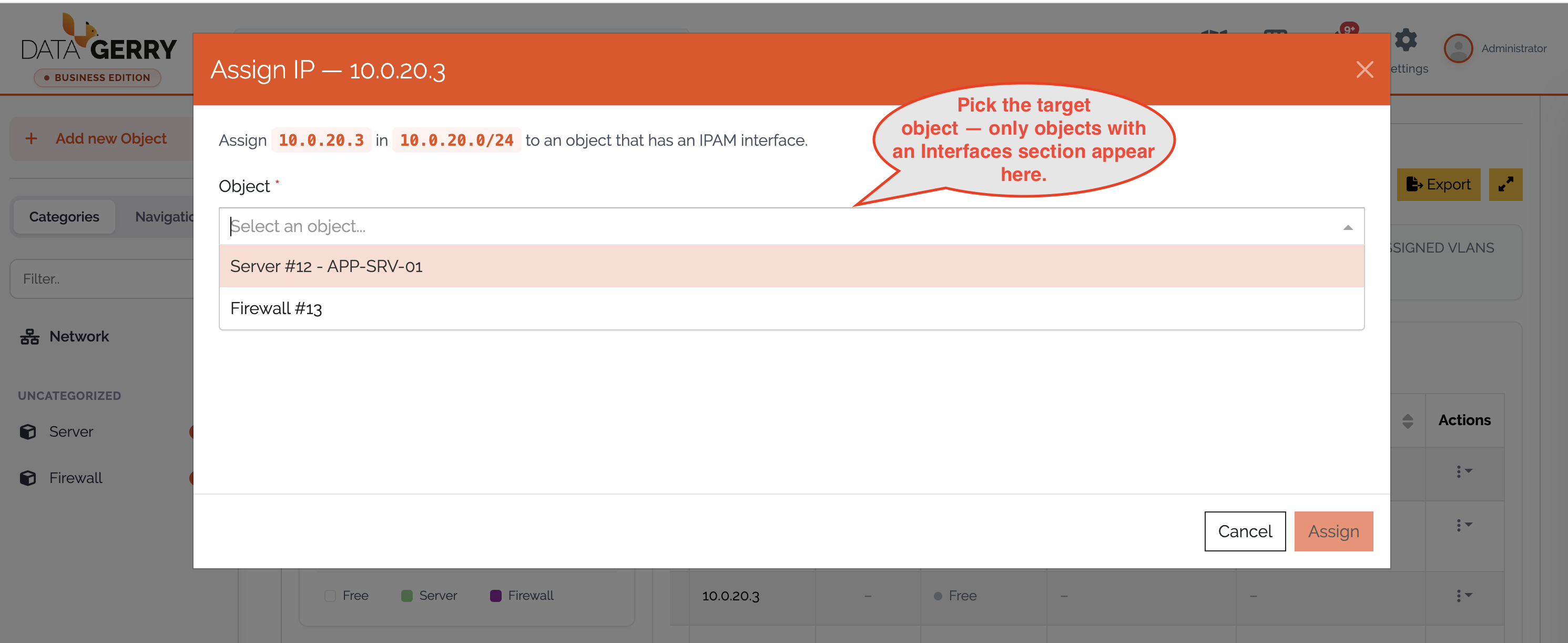
Selecting the target object.

The assigned address in the IP table.
On the object
Any object with the Interfaces section can manage its addresses directly. An interface entry has these fields:
Field |
Meaning |
|---|---|
Active |
Whether the entry is active. |
Type |
Address family (IPv4 / IPv6). Decides which subnets are offered; changing it clears the selected subnet. |
Network |
The subnet, filtered by Type. |
IP-Address |
The address (validated). |
Hostname, Domain, Mac-Address |
Further details. |
Interfaces can be linked to the object’s ports (3.3) — see Ports and cabling.
Unassign an IP address
For a row with an owner in Assigned To, choose Unassign (single row or a bulk selection) and pick a mode:
Subnet (default) — frees the address but keeps the interface entry; only the subnet reference is cleared.
Interface entry — removes the whole interface entry from the object.
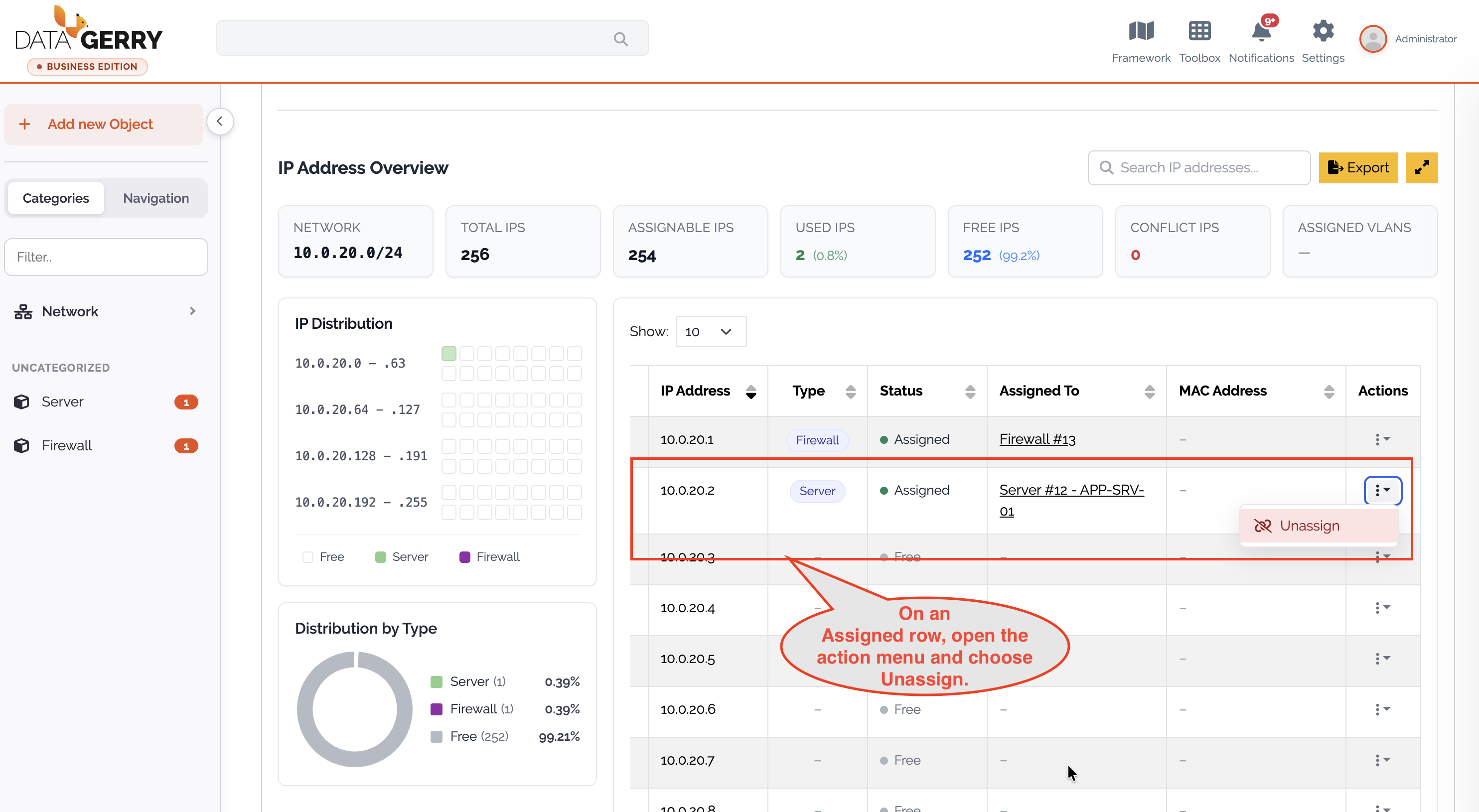
Unassigning an IP address.
Validation rules
The same rules apply in the interface and on the server:
CIDR — ranges must be canonical (host bits zero:
10.0.0.0/24is valid,10.0.0.5/24is not). The prefix is an integer,/0–/32for IPv4 and/0–/128for IPv6.IP addresses — canonical IPv4 (dotted quad) or IPv6. IPv6 addresses are normalised on save so uniqueness checks are exact.
MAC addresses — colon or hyphen separated (
00:1A:2B:3C:4D:5E) or Cisco dotted (001a.2b3c.4d5e).Address counting — for IPv4, Assignable IPs excludes the network and broadcast address for
/30and larger blocks;/31and/32follow RFC 3021. For IPv6 every address is assignable.Uniqueness — within a subnet, an address can be assigned only once across all objects’ interface entries.
Notes and limitations
Conflicts — you may change a supernet’s or subnet’s range even if child subnets or assigned addresses end up outside it. Those entries are then flagged as Conflict so you can repair or unassign them; the Conflict IPs card counts them.
Delete guards — a supernet cannot be deleted while a subnet references it; a subnet cannot be deleted while a VLAN or interface entry references it. VLANs can always be deleted.
IPv6 — percentages and utilisation bars are hidden, and large counts are shown in compact form.
Very large IPv4 subnets — above
/12, search, sorting and filtering in the IP table are disabled for performance; you can still browse the addresses in ascending order.Assignment prerequisite — an object can only receive an address if its type has the Interfaces section.
Rights
IPAM uses the rights base.framework.ipam.view (overviews, the Networks tree,
validation) and base.framework.ipam.edit (for example unassigning subnets and
addresses), on top of the normal object rights. See Rights.