Webhooks
A webhook sends an HTTP POST request to an external URL whenever an object is created, updated or deleted. Use it to sync data to other systems, trigger automation pipelines, or log changes to an external audit system. The request body is described in Webhook payload.
Note
Webhooks fire for object events only: Create, Update and Delete.
How webhooks work
An object event triggers every active webhook whose event types include the event.
DataGerry sends the payload as JSON in a POST request: on create the new object, on update the object before and after plus the changes, on delete the object as it was before deletion.
Delivery runs in the background and never blocks or breaks the object operation.
Any
2xxresponse counts as delivered. Redirects are not followed, so a3xxis not delivered. The request times out after 3 seconds.Every attempt, successful or not, is recorded in the webhook log. A request that got no response at all is logged with response code
0.Only
httpandhttpsURLs on public addresses are accepted. A URL whose host resolves to a loopback, private, link-local or other non-public address is refused when you save the webhook and again before every delivery.
Ownership
(3.3) Every webhook has an owner: the user who last saved it. Because the payload leaves DataGerry — and with it the type’s access control — a webhook only receives events for objects whose type its owner may read:
An event about an object of a type the owner can’t read is skipped and not logged.
A webhook whose owner no longer exists, is deactivated, or was never recorded (webhooks from before 3.3) receives nothing until someone saves it again.
Saving a webhook makes you its owner. When you edit someone else’s webhook, or one without an owner, the form warns you about this before you save.
The Owner column of the webhook list shows the owner and flags webhooks that receive nothing (no owner, or an inactive owner).
Manage webhooks
Go to Toolbox → Webhooks. The list shows ID, name, URL, owner and status.
Add creates a webhook.
The pencil and trash icons edit and delete a webhook.
Webhook Logs opens the delivery log.

The webhook list.
Access is controlled by base.framework.webhook.view, add, edit and delete
(enforced on routes, menu and save action in 3.3). See Rights.
Create a webhook
Field |
Meaning |
|---|---|
Name |
A descriptive name, for example Sync to external CMDB. |
URL |
The endpoint that receives the POST request, for example
|
Event Types |
One or more of Create, Update, Delete. |
Active |
Only active webhooks are evaluated. |
Click Save.
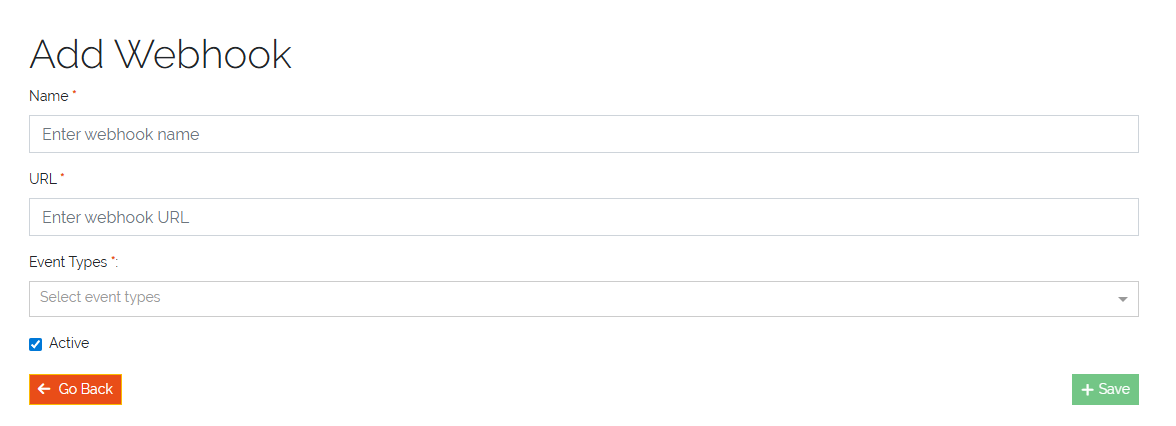
Creating a webhook.
Check deliveries
Webhook Logs lists every delivery attempt with webhook ID, date, status and response code. Delete entries you no longer need with the trash icon. Changes to objects the webhook owner may not read do not appear here.
Examples
- Notify an inventory system about new objects
Event type Create, URL
https://inventory.example.com/api/object-created. When a server or workstation is created, the inventory system receives its data.- Log deletions to an audit system
Event type Delete, URL
https://audit.example.com/webhooks/object-deleted. The audit system receives each deleted object as it was before deletion.