File Explorer
The File Explorer, accessible via , provides a structured interface for managing files and folders within the system. It enables users to upload, organize, and maintain documents and related resources in a hierarchical folder tree.
Overview
The interface is split into two main sections:
Left Pane: Displays a tree structure of folders. Initially, only the root folder is visible.
Right Pane: Displays a list of files contained in the currently selected folder.
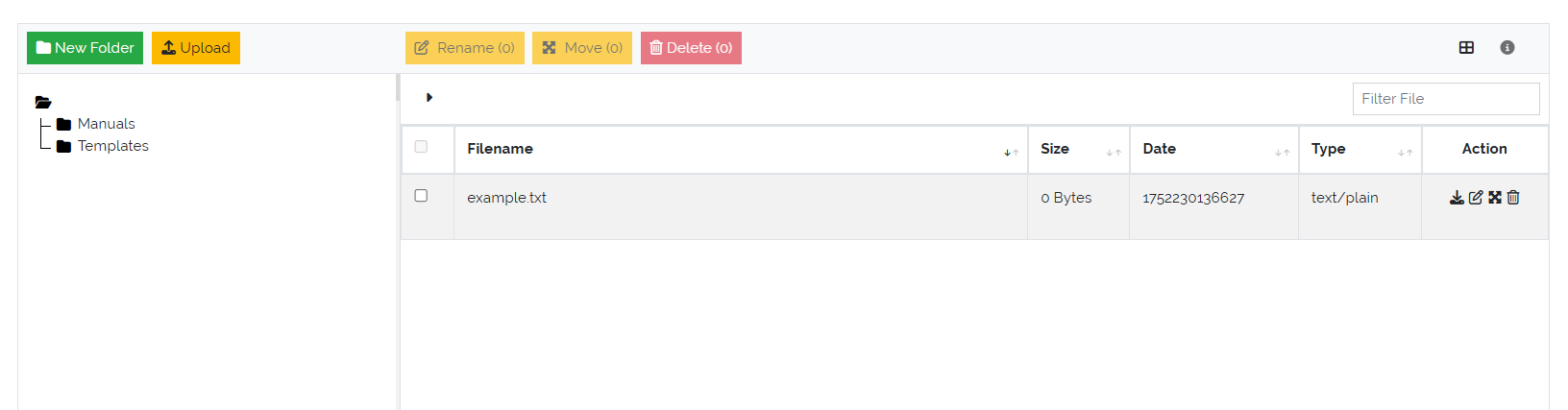
Picure: File Explorer overview
Folder Management
Above the folder tree are two action buttons:
New Folder: Creates a subfolder within the currently selected folder.
Upload: Uploads one or more files into the currently selected folder.
Users can build and maintain a hierarchical folder structure suitable for organizing project documentation, templates, evidence files, and more.
File and Folder Operations
The following actions are available for both files and folders:
Edit: Rename folders or update file metadata.
Move: Reorganize content by moving files and folders to different locations within the tree.
Delete: Permanently removes a file or folder.
Warning
Deleting a folder will also delete all its contents, including any subfolders and files. This action is irreversible and should be done with caution.
Benefits
Centralized storage of ISMS documentation and artifacts.
Easy navigation through a structured folder hierarchy.
Quick upload and retrieval of compliance evidence or working documents.
Intuitive UI for file and folder management.