Webhooks
Webhooks allow for seamless integration with external systems by automatically sending HTTP POST requests when specific events occur within the application. This enables automated workflows, real-time synchronization, and external monitoring.
Note
At the current state of development Webhooks are evaluated exclusively for Object-based events (CREATE, UPDATE and DELETE).
Each webhook is tied to one or more event types and is configured to point to a specific external URL. When a matching event occurs, the system sends a payload representing the object involved (with relevant context depending on the action) to the configured endpoint.
This feature is ideal for organizations that need to:
Sync data to third-party systems (e.g., CMDBs, ticketing tools, or analytics platforms)
Trigger external automation pipelines
Log changes or deletions in real-time to external audit systems
React to system state changes using external scripts or applications
Manage Webhooks
Navigate to Toolbox → Webhooks to manage and monitor webhooks.

Picture: Webhooks table
The Webhooks interface includes:
A table displaying all configured webhooks
A “View Logs” button above the table for reviewing past webhook executions
A “Create Webhook” button to configure a new webhook
How Webhooks Work
Webhooks are triggered automatically when an Object is created, updated, or deleted in the system.
For each webhook:
If the event type matches the action (e.g., “create”, “update”, “delete”), then the webhook is triggered
The object payload (depending on the event) is sent via POST to the configured webhook URL: - On create: the full created object - On update: the updated object with the changed fields - On delete: the full object prior to deletion
Note
Only webhooks with active = True are evaluated during event processing.
Webhook Schema
Each webhook is defined by the following fields:
Name |
A descriptive name for the webhook (e.g., Sync to External CMDB) |
URL |
The endpoint URL that receives the HTTP POST request when the webhook is triggered |
Event Types |
A list of event types that should trigger the webhook. Possible values include:
|
Active |
A boolean flag indicating whether the webhook is currently active |
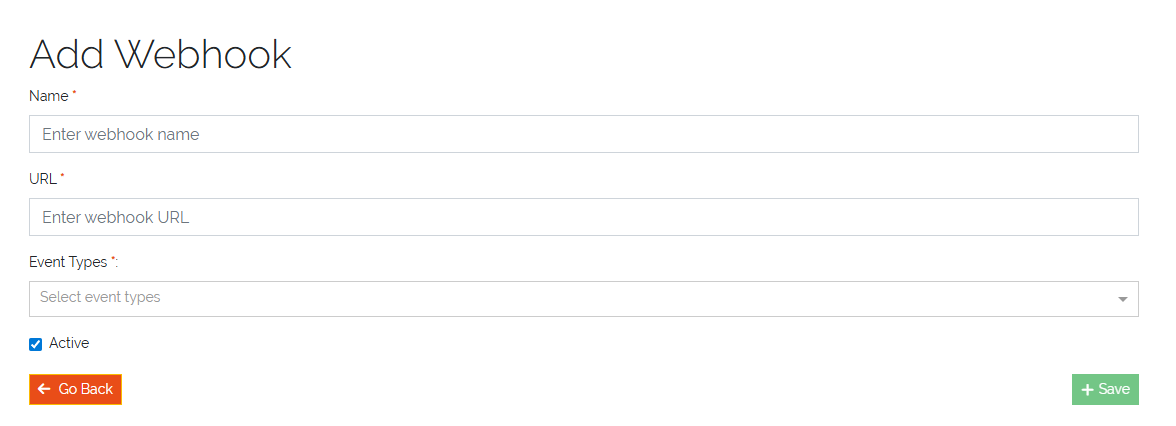
Picture: Webhooks create form
Examples
Notify an External Inventory System on Object Creation
Event Type: create
Webhook URL: https://inventory.example.com/api/object-created
Use Case: When a new CMDB object (e.g., server, workstation) is created, a webhook automatically notifies an external inventory or asset management system with the new object’s data.
Log Object Deletions to an Audit Trail System
Event Type: delete
Webhook URL: https://audit.example.com/webhooks/object-deleted
Use Case: If a CMDB object is deleted, this webhook sends the deleted object’s data (as it existed before deletion) to an external audit system for compliance tracking and record keeping.