Section Templates
Section templates allow users to create custom sections and insert them via drag-and-drop in type configurations. This is particularly useful when the same group of fields (a section) is used for different Types. Section templates speed up the creation and modification of Types, eliminating the need to repeatedly create recurring sections.
Section templates can be accessed at the top right corner at Framework => Section Templates.
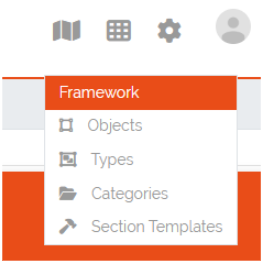
Picture: Accessing Section Templates
Section Templates Overview
In the Section Templates overview all created templates are displayed with their PublicID, Name, Type and the corresponding actions. At the top left corner of the table is the “Add”-Button with which new section templates can be created.

Picture: Section Templates overview
Creating Section Templates
In this form a section template can be built the same way as in Type configurations by drag and drop of elements from the “Controls”-Sidebar into the “Fields”-area of the section. The only control that is not available to section templates is the special control Location since a type can only have one of these controls and is therefore only setable directly in the type configuration. Additionally there is a checkbox in the section header where the template can be defined as a Global section template, this can not be changed when editing a section template. If the checkbox remains unchecked the created section template will be of type Standard.

Picture: Creation of Section Templates
Using Section Templates
After a section template has been created it can be used in Type configurations. In the sidebar of the Type configuration are two areas, the Global Section Templates area which contain all global and predefined section templates and the Section Templates area which contains all Standard section templates. They can be added to the Type configuration via drag and drop the same way a new section would be added. Global Section Templates are not editable inside the Type configuration.

Picture: Using section templates in type configuration
Section Template Types
There are three different types of templates each with a specific purpose. Below is an overview of the characteristics of each section template type.
Standard Section Templates
It can be dropped multiple times inside the same Type configuration
After it is dragged inside the Type configuration it can be further modified and additional fields can be added or existing ones can be deleted
It can be converted into a Global Section Template
Changing a standard section template in the template configuration won’t affect already used instances of it
There is no programatical connection between the Standard Section Template and the Type
Global Section Templates
It can be dropped only once inside the same Type configuration
It can not be further modified after it was added to a Type configuration
Changes to the global section template in the template configuration will affect all existing instances of the template
Example 1: Adding a field will add the new field to all existing instances of this template
Example 2: Removing a field will also remove this field from all existing instances of this template (the stored value is lost)
Example 3: Deleting a global section template will also delete the section and its data from all
Types are tracking all of their used Global Section Templates
Predefined Section Templates
They have the same characteristics as Global Section Templates but are delivered by DataGerry
They are not editable or deletable by the user
Users can create a clone of Predefined Section Templates but the clone will no longer be considered as a predefined section template
Section Templates - Table Actions
There are different actions for created section templates depending on the template type. Below is an overview and explanation of each.

Picture: Actions for created section templates
Open Preview 
Opens a preview of the section template which will display how the created section and its fields will look like.
Edit Section Template 
Redirects the user to the edit form for the section template. This action is not available for predefined templates. Editing a global section template in this form will affect all Types and Objects using this template.
Clone Section Template 
With this action users can create a clone of an existing template(even a predefined template). A popup will open where the name and the type of the template can be set. After confirmation the clone will be created. A cloned predefined template is either of type standard or global.
Transform Standard Template 
A standard template can be transformed into a global section template by pressing this action. When the template is transformed it is seen as a new global section template which means that the previous uses of this standard template on Types are not tracked. Users should consider that this action can not be undone. This action is only available to standard templates.
Global Template Indicator 
This is just an indicator that this template type is Global and should represent that this Types can not be transformed. All predefined templates are also global templates.
Delete Template 
With this action section templates can be deleted. Consider that deleting a global section template will also remove it and all set values from Types and Objects. The amount of affected Types and Objects will be displayed in the confirmation popup.
Predefined templates are not deletable.
Section Templates - Rights
The section for managing Section Templates has its own set of rights.
base.framework.sectionTemplates.*
This right grants all the rights mentioned below and allows the user to do everything with section templates.
base.framework.sectionTemplates.view
This right is required to access the section templates via Framework => Section Templates. Furthermore it is required for the Open Preview action.
base.framework.sectionTemplates.create
This right is required to create new section templates. Together with base.framework.sectionTemplates.edit it is required to clone templates.
base.framework.sectionTemplates.edit
This right is required to edit existing section templates. Together with base.framework.sectionTemplates.create it is required to clone templates.
base.framework.sectionTemplates.delete
This right is required to delete existing section templates. Predefined section templates are not deleteable.