IPAM
IP Address Management (IPAM) lets you model and track your entire IP address space directly inside the CMDB. You register large network blocks (Supernets), divide them into Subnets, and see at a glance which individual IP addresses are in use or free — and which object each used address belongs to. Because IPAM is built on top of the regular Types and Objects, assigning an IP address to a device is the same act as recording it in DataGerry.
Note
IPAM is a premium feature of the Self-Hosted Edition. On an on-premise installation it must be unlocked through License Management. In the Cloud Edition it is available depending on your subscription. Without the required license, IPAM views are shown as read-only with an Upgrade to unlock hint.
Concepts
IPAM does not use a separate data store. Its entities are ordinary DataGerry Objects based on dedicated special types. When you create the IPAM types (see Setting up IPAM), the reference fields between them are wired automatically.
Supernet – A top-level network block (e.g.
10.0.0.0/8). It defines an address family (IPv4 or IPv6) and a network range in CIDR notation.Subnet – A network range contained within a Supernet (e.g.
10.0.1.0/24). A Subnet may optionally reference a parent Supernet; a Subnet without a parent is listed as Unassigned.VLAN – An optional entity referencing a Subnet, used to record VLAN information (Static / Dynamic).
Interface – The predefined Interfaces Section Template (a Multi-Data Section). This is how a regular object (server, client, router, …) claims one or more IP addresses. An address counts as used precisely when an interface entry on some object references its subnet and holds that IP.
The entities relate through standard reference fields: Subnet → Supernet, VLAN → Subnet and Interface → Subnet.
Setting up IPAM
Before you can manage addresses, the three IPAM special types (Supernet, Subnet, VLAN) must exist. You have two options:
DataGerry Assistant – The DataGerry Assistant provides an IPAM profile that creates the Supernet, Subnet and VLAN types (in this order, so their cross-references wire up correctly) inside a Network category.
Type Builder – When creating a new Type, use the Special type selector in the basic step to mark the type as Supernet, Subnet or VLAN.
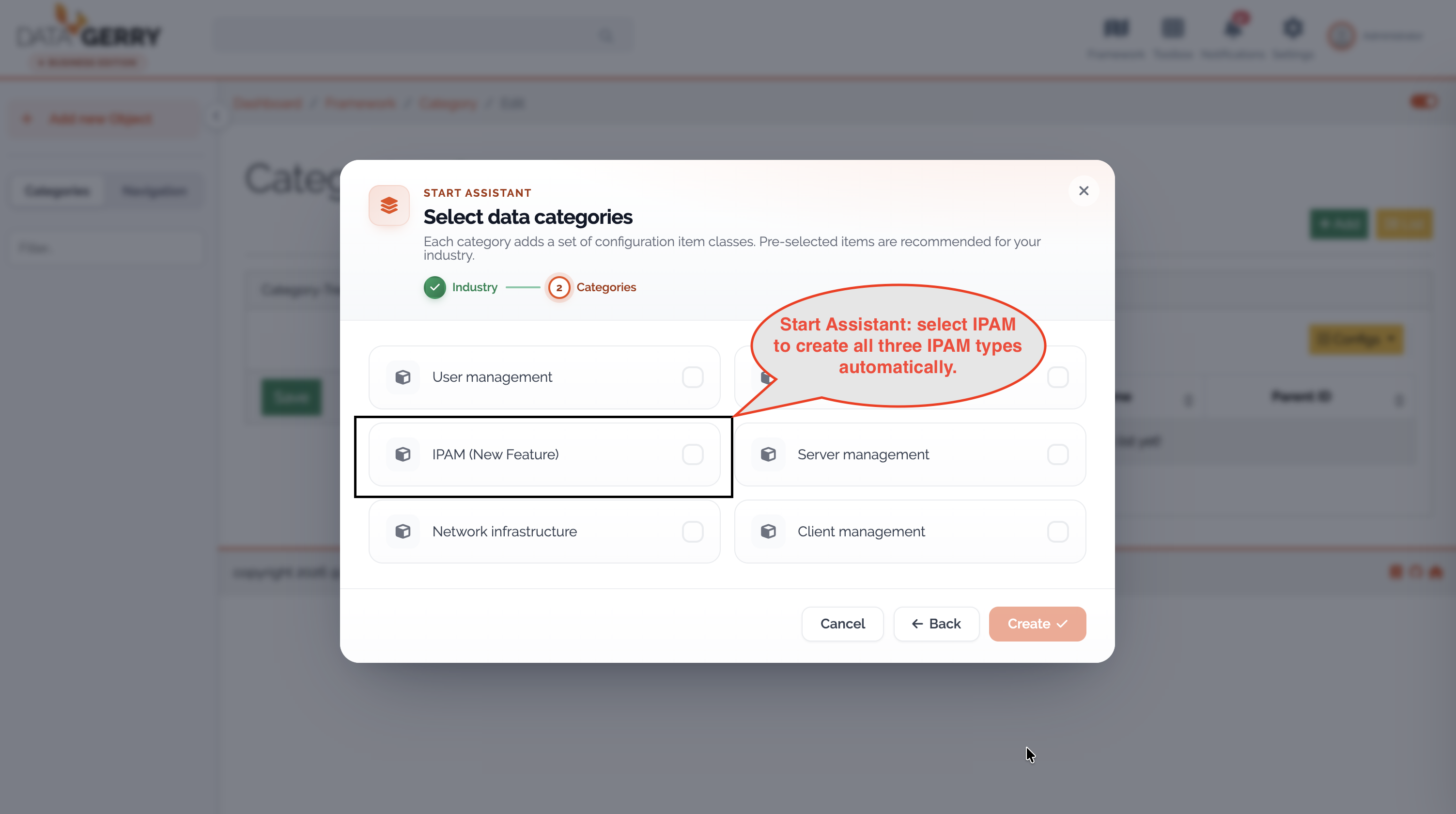
Picture: Creating the IPAM types via the Start Assistant
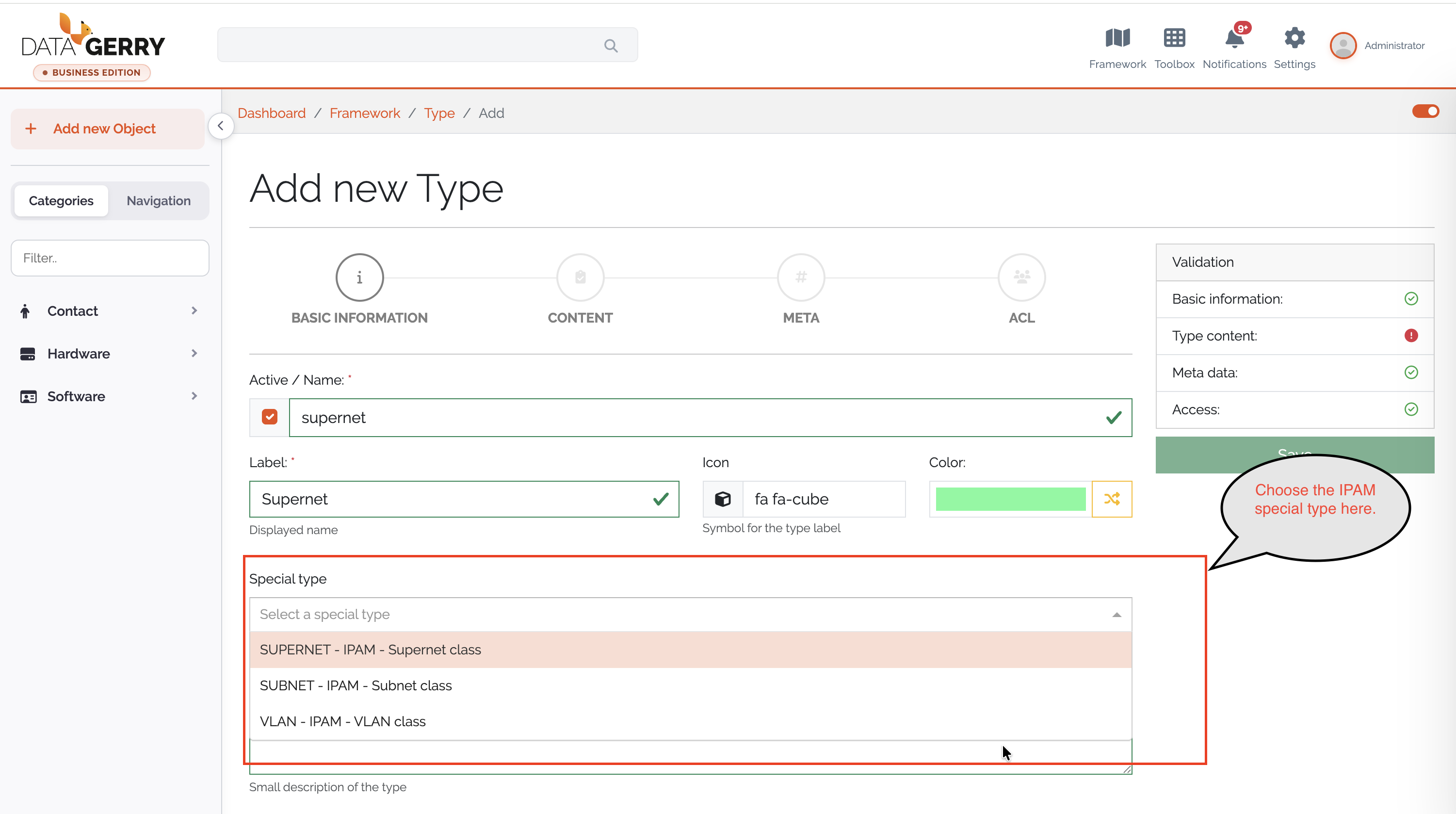
Picture: Creating the IPAM types via the type configuration
Navigating IPAM
Open the Networks tree in the left sidebar: select the Navigation tab, then the Networks sub-tab. The tree lists all Supernets (expandable to their child subnets) and an Unassigned section for subnets without a parent supernet. Each node shows its CIDR, an IPv4/IPv6 badge and the object name, and a Search networks… box helps you locate an entry.
Clicking a node opens the corresponding object view. IPAM has no separate page — the overviews render inside the standard object view, below the object’s attributes:
Opening a Supernet object shows the Supernet Overview.
Opening a Subnet object shows the IP Address Overview.
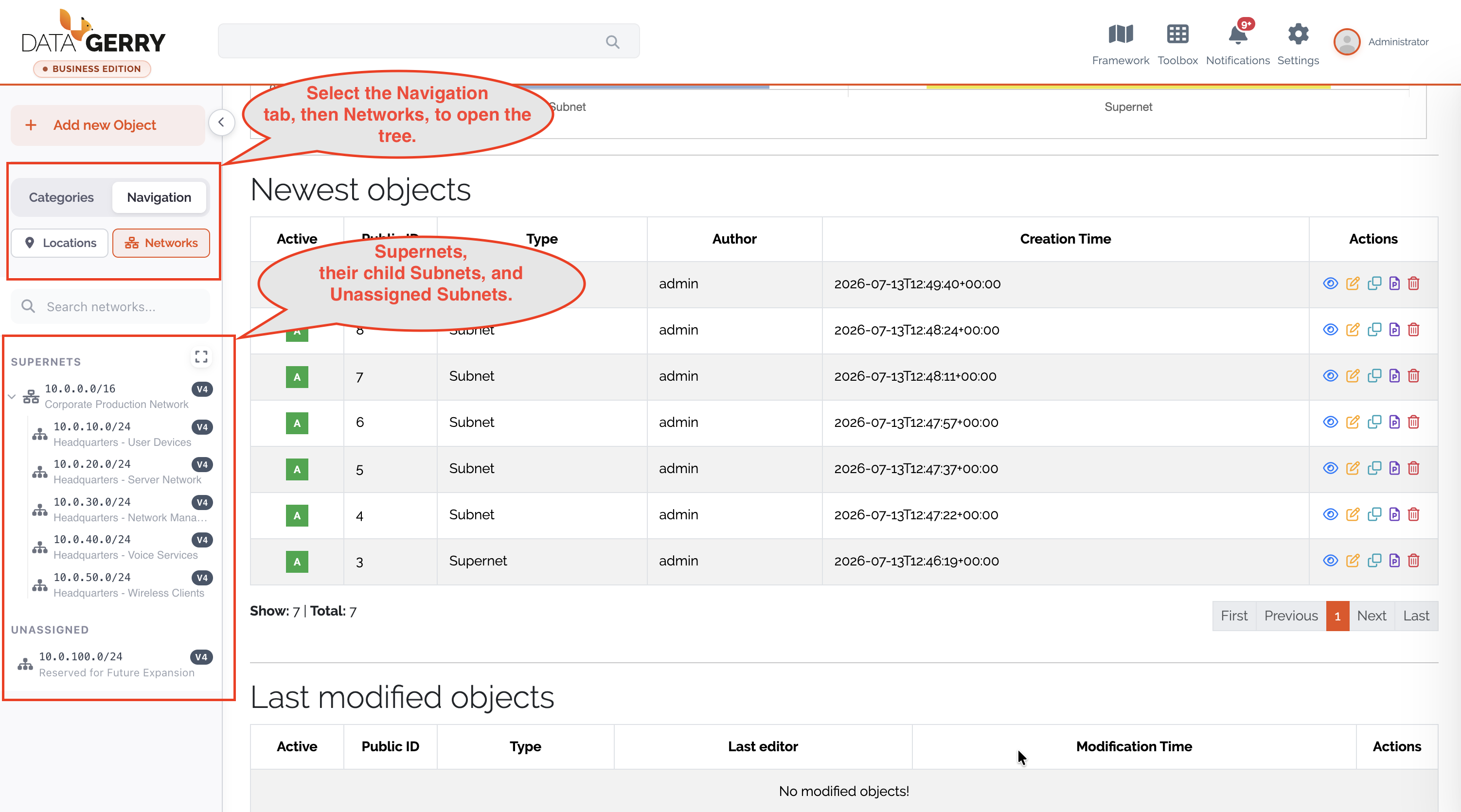
Picture: The Networks tree in the sidebar
Registering a Supernet
Create a new object of your Supernet type (Add Object → select the Supernet type).
Fill in the fields:
Name – A descriptive name for the network block.
Type – The address family, IPv4 or IPv6 (required).
Network Range – The network in canonical CIDR notation, e.g.
10.0.0.0/8(required).
Save the object. DataGerry validates that the range is a canonical CIDR and that the selected Type matches the family of the range.
Open the saved Supernet to view its overview.
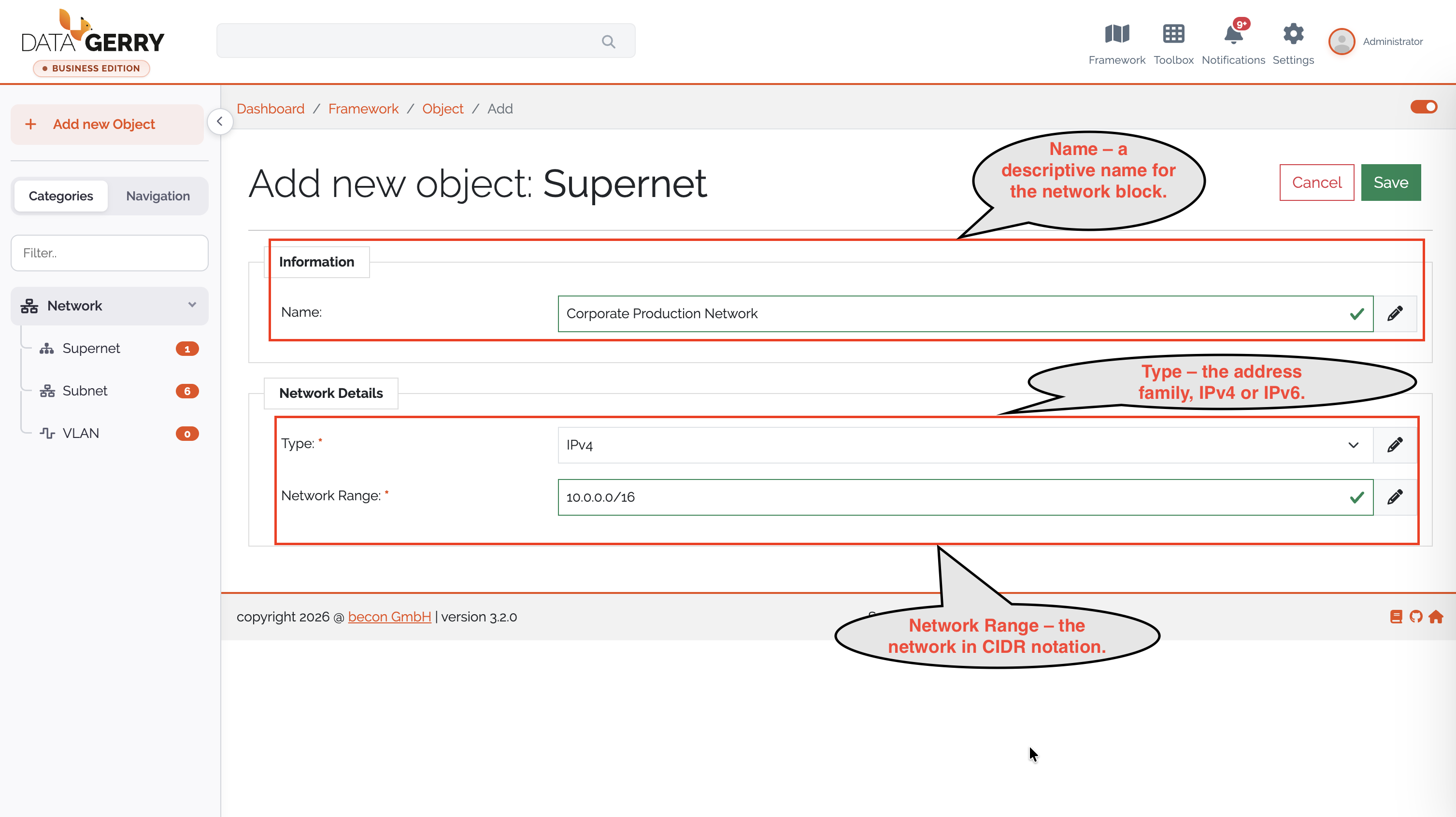
Picture: Creating a supernet
Supernet Overview
The Supernet Overview summarizes the utilization of the whole block and lists its subnets.
Key figures – Total Subnets, Total IPs, IP Range (first–last address), Used IPs, Free IPs and Conflict IPs. For IPv4 supernets an Overall Utilization bar is also shown. (Percentages and utilization are omitted for IPv6, where they are not meaningful against the address space size.)
Subnet table – Lists the child subnets with their CIDR, Used IPs, Free IPs, VLANs and (IPv4 only) Utilization. The table is a lazily expandable tree; child subnets are loaded when you expand a row. A Search subnets… box and an Export button (CSV) are available.
Unassign subnets – Use the per-row action, or select multiple rows and use the bulk action, to remove subnets from this supernet. After confirmation the subnet’s parent reference is cleared and the subnet becomes Unassigned (it is not deleted).
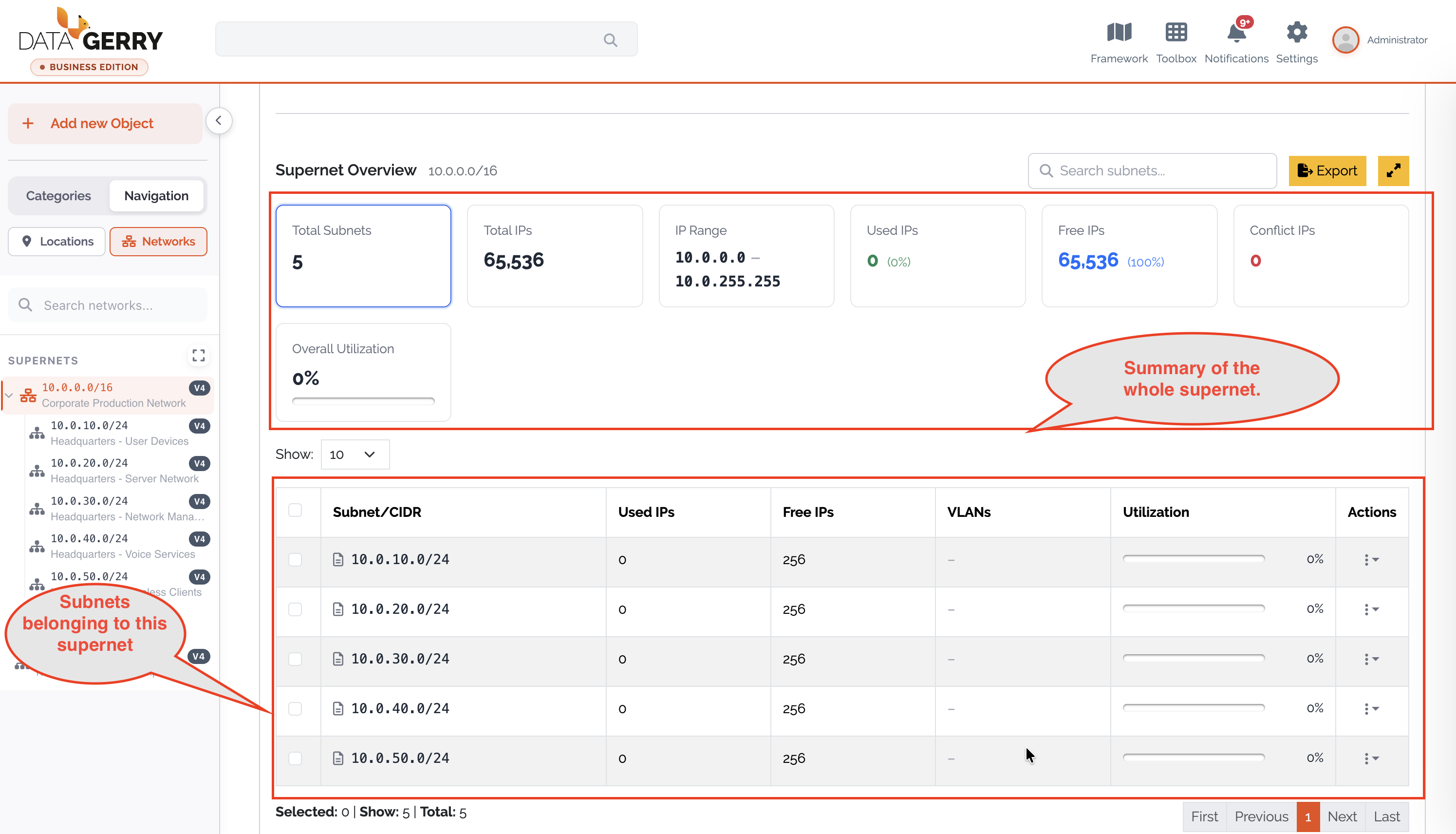
Picture: Supernet Overview
Registering a Subnet
Create a new object of your Subnet type.
Fill in the fields:
Name – A descriptive name.
Supernet – (Optional) the parent Supernet. A subnet without a parent is listed as Unassigned.
Type – The address family, IPv4 or IPv6 (required).
Network Range – The subnet in canonical CIDR notation, e.g.
10.0.1.0/24(required).
Save the object.
While you edit the Network Range, DataGerry validates it live against the backend. The range must be a canonical CIDR whose family matches the selected Type, and — if a parent Supernet is set — it must be contained within that supernet and must not overlap any sibling subnet under the same supernet. The same rules are enforced when the object is saved.
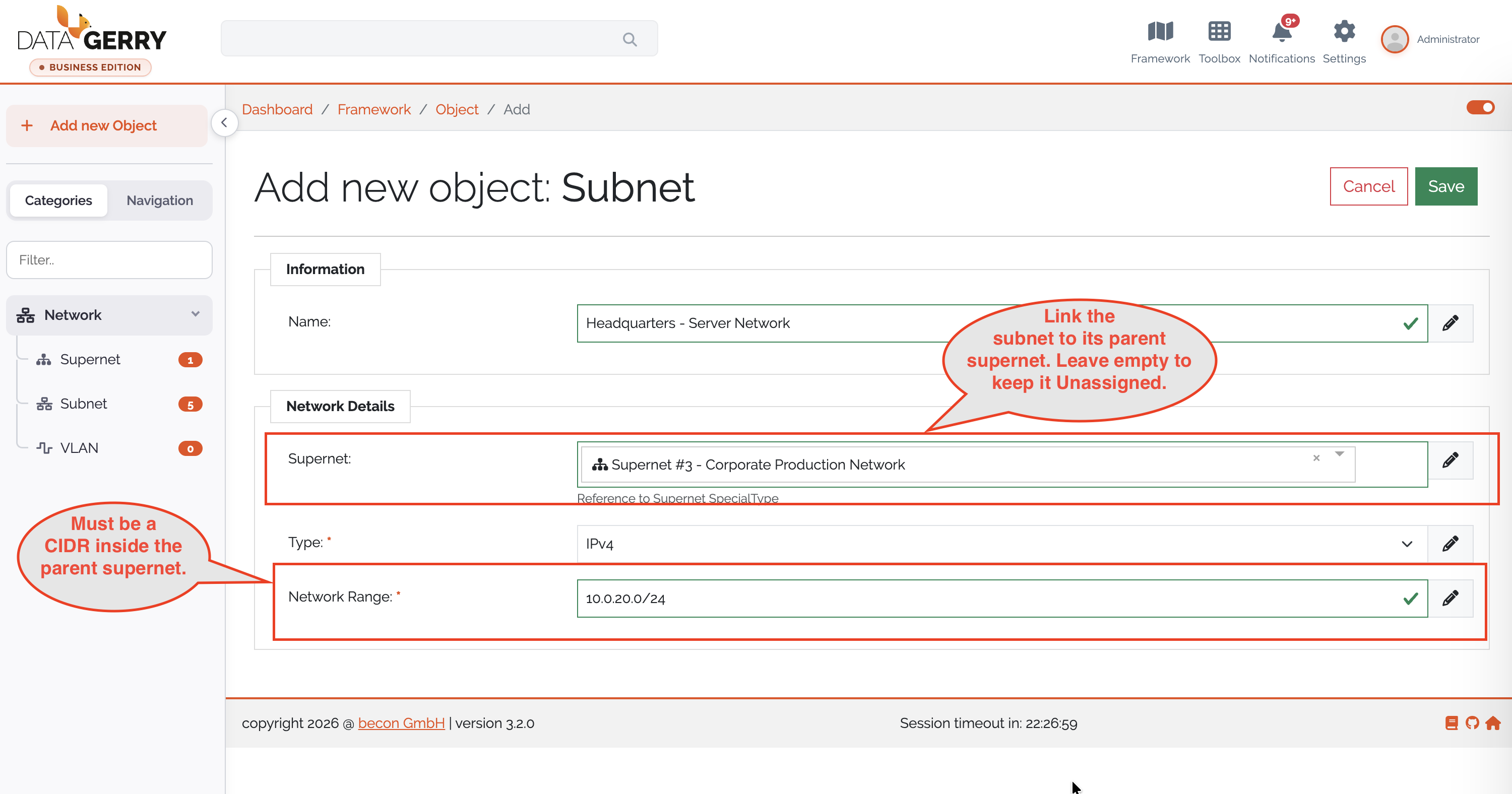
Picture: Creating a subnet with live network-range validation
IP Address Overview
Opening a Subnet object shows the IP Address Overview, which lists every address of the subnet and its status.
Key figures – Network (CIDR), Total IPs, Assignable IPs, Used IPs, Free IPs, Conflict IPs and Assigned VLANs.
Distribution charts – An IP distribution heatmap and a Type distribution chart visualize how the address space is used.
IP table – Columns for IP Address, Type, Status, Assigned To, MAC Address and Actions. All columns except Actions are sortable; free addresses always sort last.
You can narrow down the table in several ways:
Click a sector in the IP distribution chart to drill down into that address range.
Click a type in the Type distribution chart to filter by type (multiple types can be selected).
Toggle Free to show only unused addresses.
Use the Search box (minimum two characters) to search the whole subnet.
Click the Conflict IPs card to show only conflicting addresses (see Conflicts).
An Export button provides the IP list as CSV.
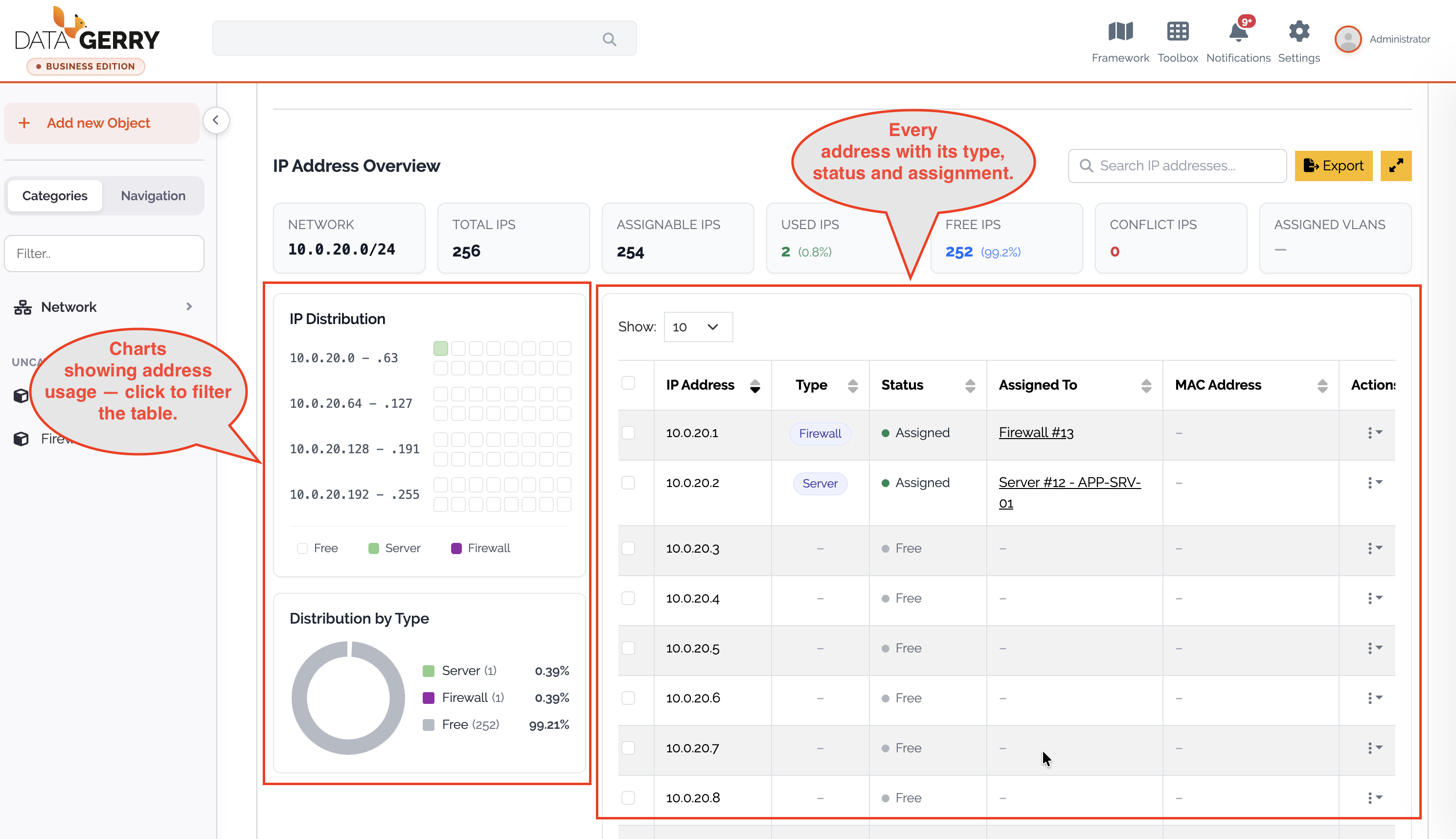
Picture: IP Address Overview
Assigning an IP address
You can assign a free address from the IP table to an existing object:
In the IP Address Overview, locate a row whose status is Free and choose its Assign action.
In the Assign IP dialog, select the target Object. Only objects that contain an Interfaces section can be selected.
DataGerry pre-fills a new interface entry for the chosen object with Active, the derived Type (address family), the Subnet and the IP address. These three fields are locked; you may fill in the remaining fields (Hostname, Domain, MAC-Address).
Click Assign. The new interface entry is added to the object and the object is saved. Existing interfaces remain untouched.
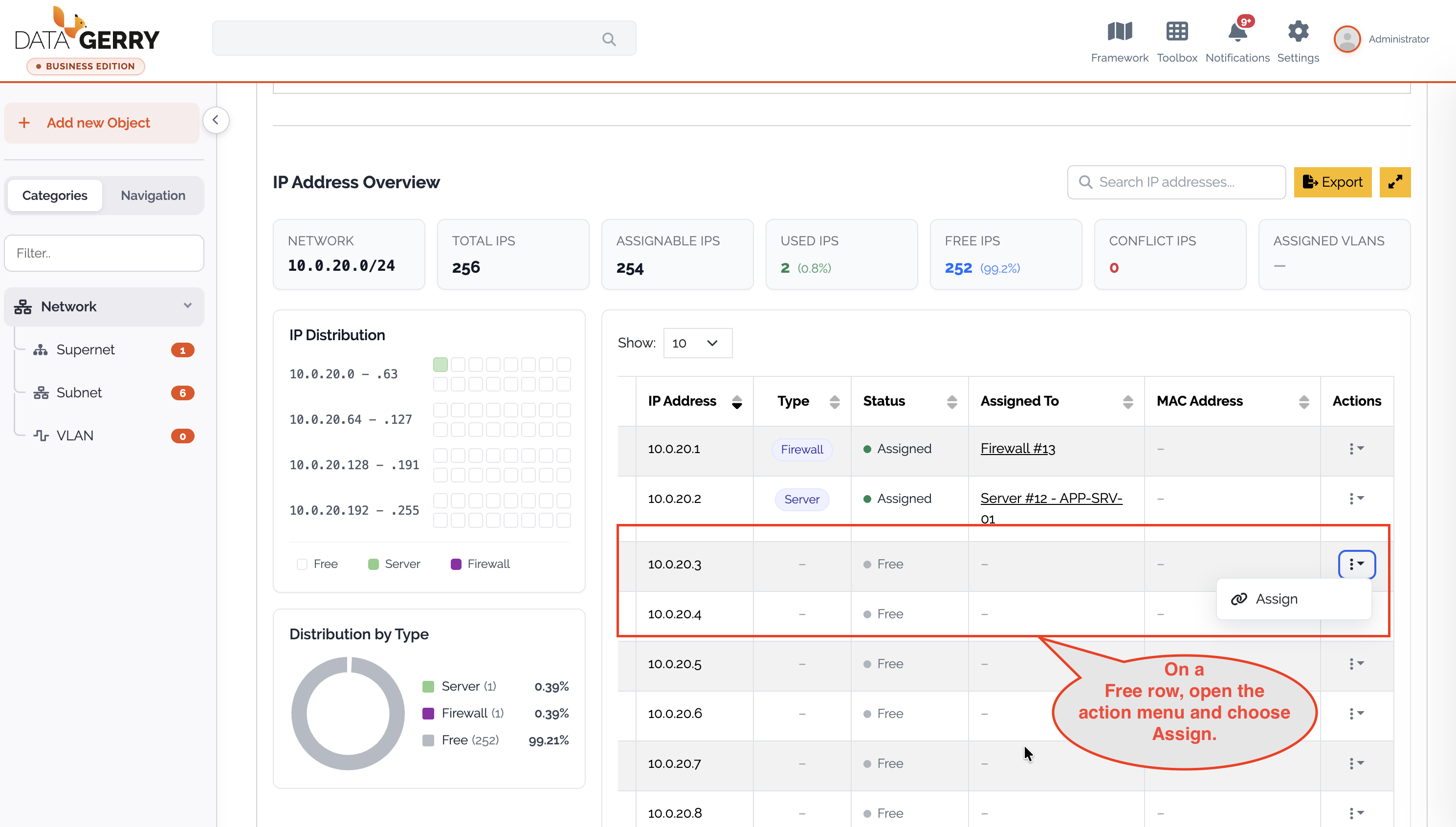
Picture: Starting the assignment from a Free IP row.
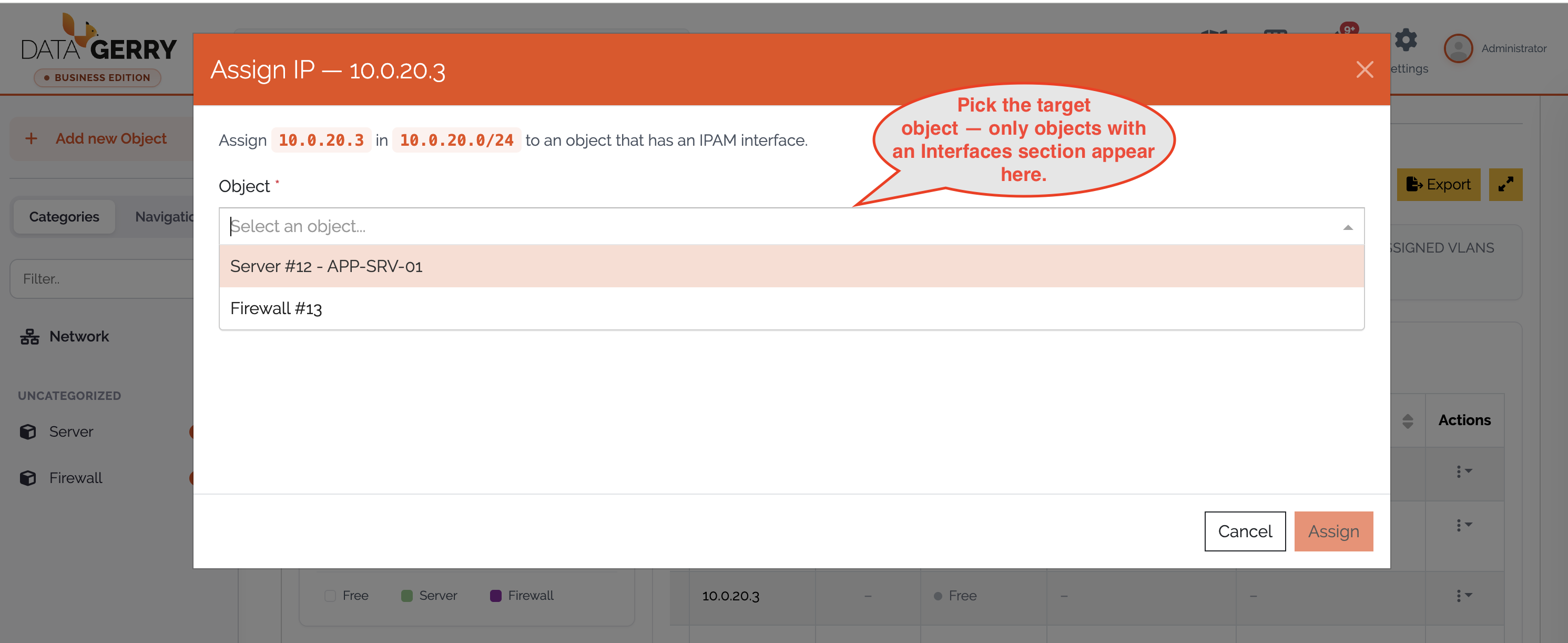
Picture: Selecting the target object in the Assign IP dialog.
Unassigning an IP address
For a row that has an owner (Assigned To), choose the Unassign action (single rows or a bulk selection). The dialog offers two modes:
Subnet (default) – Frees the IP address but keeps the interface entry on the object (only the subnet reference is cleared).
Interface entry – Removes the whole interface entry from the object.
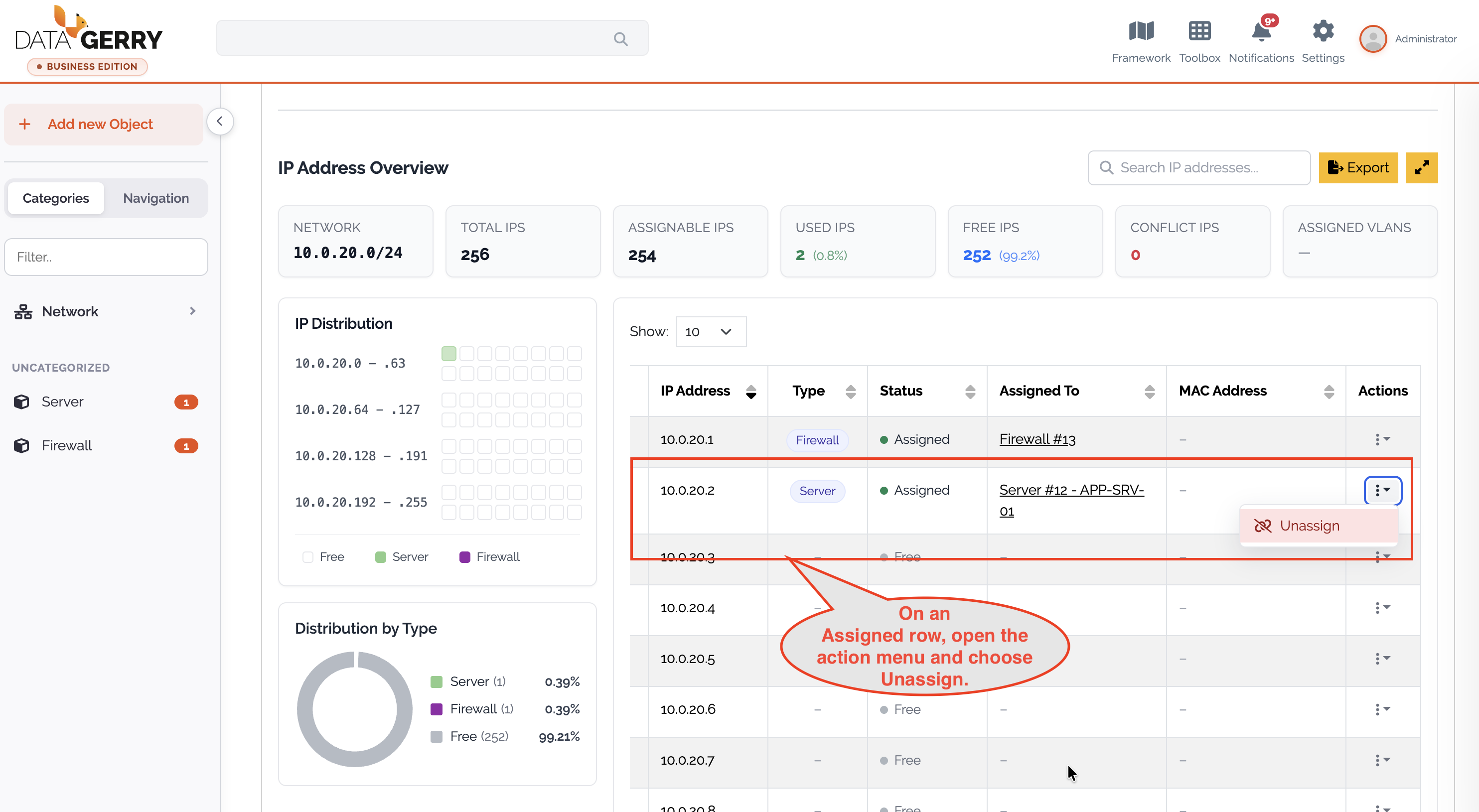
Picture: Unassigning an IP address
Assigning a subnet on an object’s interface
You can also manage addresses directly on any object that has the Interfaces section. Each interface row contains:
Active – Whether the interface entry is active.
Type – Address family (IPv4 / IPv6). It determines which subnets are offered.
Network – A subnet picker filtered by the selected Type.
IP-Address – The IP address (validated).
Hostname, Domain, Mac-Address – Additional interface details.
Changing the Type clears the current subnet selection and reloads the list of matching subnets.
Validation rules
DataGerry enforces the following rules consistently in the UI and on the server:
CIDR – Ranges must be canonical (host bits zero, e.g.
10.0.0.0/24is valid,10.0.0.5/24is not). The prefix length must be an integer (/0–/32for IPv4,/0–/128for IPv6).IP addresses – Must be canonical IPv4 (dotted-quad) or IPv6 addresses. IPv6 addresses are normalized on save so that uniqueness checks are exact.
MAC addresses – Accepted as colon/hyphen-separated (
00:1A:2B:3C:4D:5E) or Cisco dotted (001a.2b3c.4d5e) notation.Address counting – Assignable IPs excludes the network and broadcast addresses for IPv4 subnets (
/30and larger blocks);/31and/32are handled per RFC 3021. For IPv6, all addresses are assignable.Uniqueness – Within a subnet an IP address may be assigned only once across all objects’ interface entries.
Notes and limitations
Conflicts – Editing a Supernet’s or Subnet’s network range is allowed even if it leaves child subnets or assigned IP addresses outside the new range. Such entries are afterwards flagged as Conflict (invalid) so that you can repair or unassign them. The number of conflicts is shown on the Conflict IPs card.
Delete guards – A Supernet cannot be deleted while any subnet references it, and a Subnet cannot be deleted while any VLAN or interface entry references it. VLANs can always be deleted.
IPv6 – Percentages and utilization bars are hidden for IPv6, and large counts are shown in a compact form.
Very large IPv4 subnets – For subnets larger than
/12, search, sorting and filtering in the IP table are disabled for performance reasons; you can still browse the addresses in ascending order.Assignment prerequisite – An object can only receive an IP address if it contains an Interfaces section.